Andro Dollar Andro Dollar
  • Advertise on Andro Dollar
  • Videos
  • Gaming
  • About Us
  • Contact Us
  • Newsletter
  • Wallpaper
  • Privacy Policy
  • Terms and Conditions
Andro Dollar Andro Dollar Andro Dollar
  • Videos
    • Unboxings
    • Reviews
    • Tips
    • Vlogs
    • Best Apps
    • Best Games
  • Shorts
  • Reviews
  • News

HOW TO : Disable Windows Defender

  • Writer Andro Dollar
  • December 9, 2019
  • 1 minute read
Total
0
Shares
0
0
0

Windows defender is free with windows 10 and it’s a very useful software that prevent malware and treats. But it can be over protective. If windows defender is slowing down your work it might be time to turn it off. We are here to help you. You’re not alone!

How to disable windows defender (easy steps)

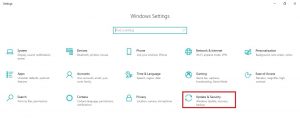
  1. In ‘Settings,’ select ‘Update & Security’
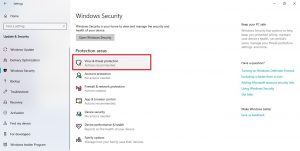
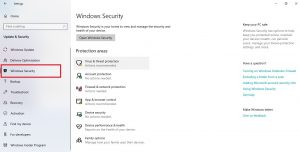
  2. Go to ‘Windows Security,’ Select ‘Virus & threat protection’
  3. In the sidebar, select ‘Virus & threat protection’
  4. Click on ‘Virus & threat protection settings’
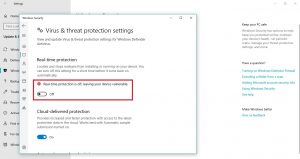
  5. Under ‘Real-time protection’ click the switch so it says ‘Off’

How to turn off windows defender.

There is easy method to turn off windows defender permanently and temporary. Although it’s not permanent you can turn it back on whenever you want. Let’s go through each step.

Turn off windows defender using windows security center.

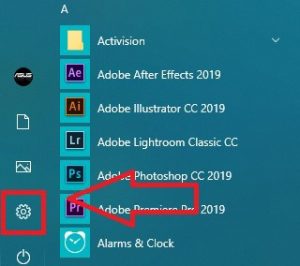
  1. Click on Windows start menu.

            Located in the left bottom of your screen.

  1. Select Setting

  1. Click Update and Security

In the new window select Update and Security
  1. Select ‘Windows Security’

In the side bar on the right, click on Windows Security
  1. Select ‘Virus and Threat Protection’

  1. Click on ‘Virus and Threat Protection Setting’
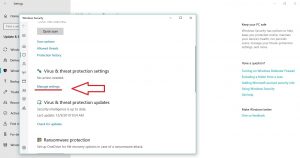
  1. Turn Real-Time Protection ‘OFF’

Congratulations! Now you’ve successfully turned off Windows Defender.

Total
0
Shares
Share 0
Tweet 0
Pin it 0
Writer Andro Dollar

Previous Article

Best Tips for the Huawei Nova 5T

  • Writer Andro Dollar
  • December 9, 2019
View Post
Next Article

Elon Musk is driving Tesla’s CyberTruck prototype around Los Angeles

  • Writer Andro Dollar
  • December 10, 2019
View Post
You May Also Like
View Post
  • Uncategorized

iPhone 16 Pro Max Review with the Good and Bad

  • Banu
  • November 26, 2024
View Post
  • Uncategorized

The Best Wireless Mechanical Keyboards of 2024

  • Andro Dollar
  • September 4, 2024
View Post
  • Uncategorized

iPhone 16 Launch Event Invitations Officially Distributed

  • Andro Dollar
  • August 29, 2024
View Post
  • Uncategorized

Galaxy Z Fold 6 Exclusive Unboxing and Initial Impressions Sri Lanka (4K)

  • Andro Dollar
  • July 28, 2024
View Post
  • Uncategorized

Samsung Galaxy Z Flip 5 Review – Compact phone of the year 2023 (After 1 month of daily use)

  • Andro Dollar
  • November 17, 2023
View Post
  • Uncategorized

Youtube Premium Launched in Sri Lanka

  • Banu
  • August 19, 2023
View Post
  • Uncategorized

My thoughts on the iPhone 13 Apple Event

  • Banu
  • September 15, 2021
View Post
  • Uncategorized

Apple unveils powerful new iPhone 13 Pro and iPhone 13 Pro max

  • Banu
  • September 14, 2021

Leave a Reply Cancel reply

You must be logged in to post a comment.

Ebates Coupons and Cash Back
Andro Dollar Andro Dollar
  • Advertise on Andro Dollar
  • Videos
  • Gaming
  • About Us
  • Contact Us
  • Newsletter
  • Wallpaper
  • Privacy Policy
  • Terms and Conditions
Tech with over a decade of experience

Input your search keywords and press Enter.

Powered by Joinchat
Hello 👋
Can we help you?
Open chat