Andro Dollar Andro Dollar
  • Advertise on Andro Dollar
  • Videos
  • Gaming
  • About Us
  • Contact Us
  • Newsletter
  • Wallpaper
  • Privacy Policy
  • Terms and Conditions
Andro Dollar Andro Dollar Andro Dollar
  • Videos
    • Unboxings
    • Reviews
    • Tips
    • Vlogs
    • Best Apps
    • Best Games
  • Shorts
  • Reviews
  • News

HOW TO : Edit the Facebook Look Back Video

  • Banu
  • February 8, 2014
  • 1 minute read
Total
0
Shares
0
0
0

This week, to celebrate turning 10, Facebook rolled out a sentimental campaign that automatically created videos for each user, based on photos and posts from the account, called Look back.

facebook-celebrates-10-years-with-a-look-back-01

My Facebook feed has been full of these videos all week. The only problem with Look Back is that the photos aren’t always that flattering or representative of what some users feel best represents their personal Facebook experience. Or, you know, maybe an ex or three are shown in the video.

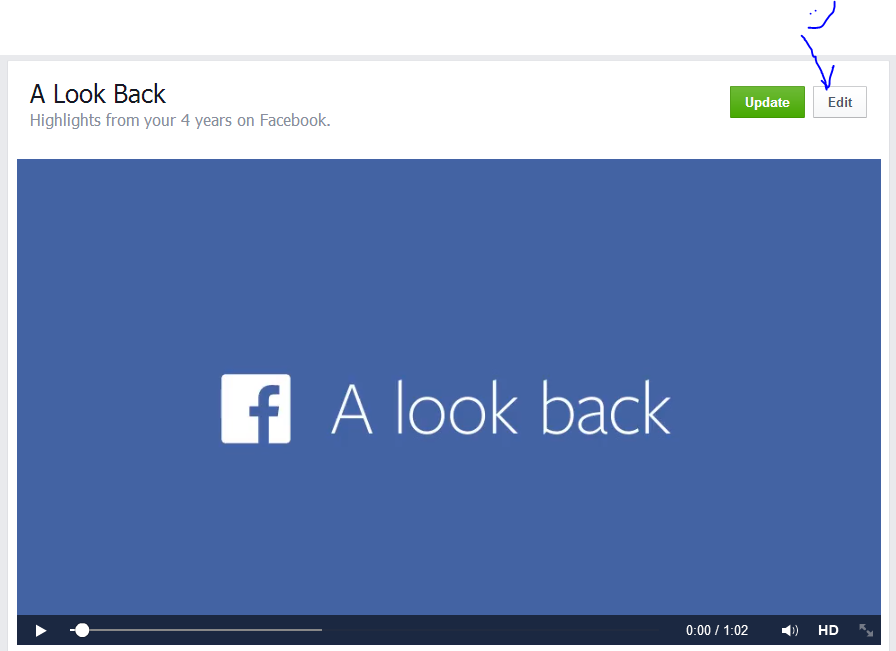
When it first launched, Facebook didn’t allow users to edit the videos, but as of today that’s no longer the case. To edit your Look Back video, visit Facebook.com/lookback. This is the same link you visited to view your video. In the top-right you’ll now find an Edit button. Clicking on it launches the editor, allowing you to pick the required number of photos for each of the four different categories.
Capture

Share the Good News with your friends.

Total
0
Shares
Share 0
Tweet 0
Pin it 0
Related Topics
  • Facebook
  • Lookback
  • Movie
  • Video
Banu

I'm Banu. I also go by as "Andro Dollar". I am a passionate tech geek born and raised in Sri Lanka who likes to do creative things and look at things differently. I'm a risk taker and a perfectionist. If I'm doing something, I'll do it right! That's my Moto.

Previous Article

HP Chromebox officially announced

  • Banu
  • February 7, 2014
View Post
Next Article

Activision has announced that the Call of Duty series has been switched to a three-year development cycle.

  • Banu
  • February 8, 2014
View Post
You May Also Like
View Post
  • How To

HOW TO : Add a VPN to your web browser in 3 simple steps

  • Writer Andro Dollar
  • May 10, 2019
View Post
  • How To

How to install Android P on your Google Pixel 2, Pixel 2 XL, Pixel or Pixel XL

  • Banu
  • March 8, 2018
View Post
  • How To

HOW TO : Install Android 8.0 Oreo Beta on to your Huawei Nova 2i NOW

  • Banu
  • March 3, 2018
View Post
  • How To

Bring back the “View Image” button on Google Images in less than 1 minute

  • Banu
  • February 19, 2018
screen-shot-2016-12-08-at-10-02-44-pm
View Post
  • How To

HOW TO : Take a screenshot on Android phones and tablets

  • Banu
  • December 8, 2016
fix-mobile-network-not-available-error-1000×875
View Post
  • How To

How To : Fix Android’s ‘insufficient storage available’ error message

  • Banu
  • November 28, 2016
Technicians working on electronics or motherboard
View Post
  • How To

HOW TO : Fix a PC that won’t start up

  • Banu
  • November 20, 2016
cable2-520×354
View Post
  • How To

HOW TO : Connect a laptop to a TV via HDMI, VGA and USB

  • Banu
  • November 14, 2016

Leave a Reply Cancel reply

You must be logged in to post a comment.

Ebates Coupons and Cash Back
Andro Dollar Andro Dollar
  • Advertise on Andro Dollar
  • Videos
  • Gaming
  • About Us
  • Contact Us
  • Newsletter
  • Wallpaper
  • Privacy Policy
  • Terms and Conditions
Tech with over a decade of experience

Input your search keywords and press Enter.

Powered by Joinchat
Hello 👋
Can we help you?
Open chat