Andro Dollar Andro Dollar
  • Advertise on Andro Dollar
  • Videos
  • Gaming
  • About Us
  • Contact Us
  • Newsletter
  • Wallpaper
  • Privacy Policy
  • Terms and Conditions
Andro Dollar Andro Dollar Andro Dollar
  • Videos
    • Unboxings
    • Reviews
    • Tips
    • Vlogs
    • Best Apps
    • Best Games
  • Shorts
  • Reviews
  • News
google-duo-andro-dollar

HOW TO : Use Google Duo

  • Banu
  • November 12, 2016
  • 2 minute read
Total
0
Shares
0
0
0

Duo, is the latest video calling app released by Google. It’s quite similar to Facetime from Apple but this has some unique features that make it just user friendly and there aren’t much options so anyone can install and easily use it. But, For those of you who are new to Video Calling, here’s how to use Google Duo.

First, I think you should have a look at the video Google put out showing off Google Duo.

Now that you have a idea about what Google Duo is, let’s get started.

Installing the app

Google Duo is available for both Android and iOS users, but it is not available for your PC.

You can download it here.

en_badge_web_genericdownload_on_the_app_store_badge-svg
After downloading, In order to use Duo, You have to link your account using your phone number.

Make a video call

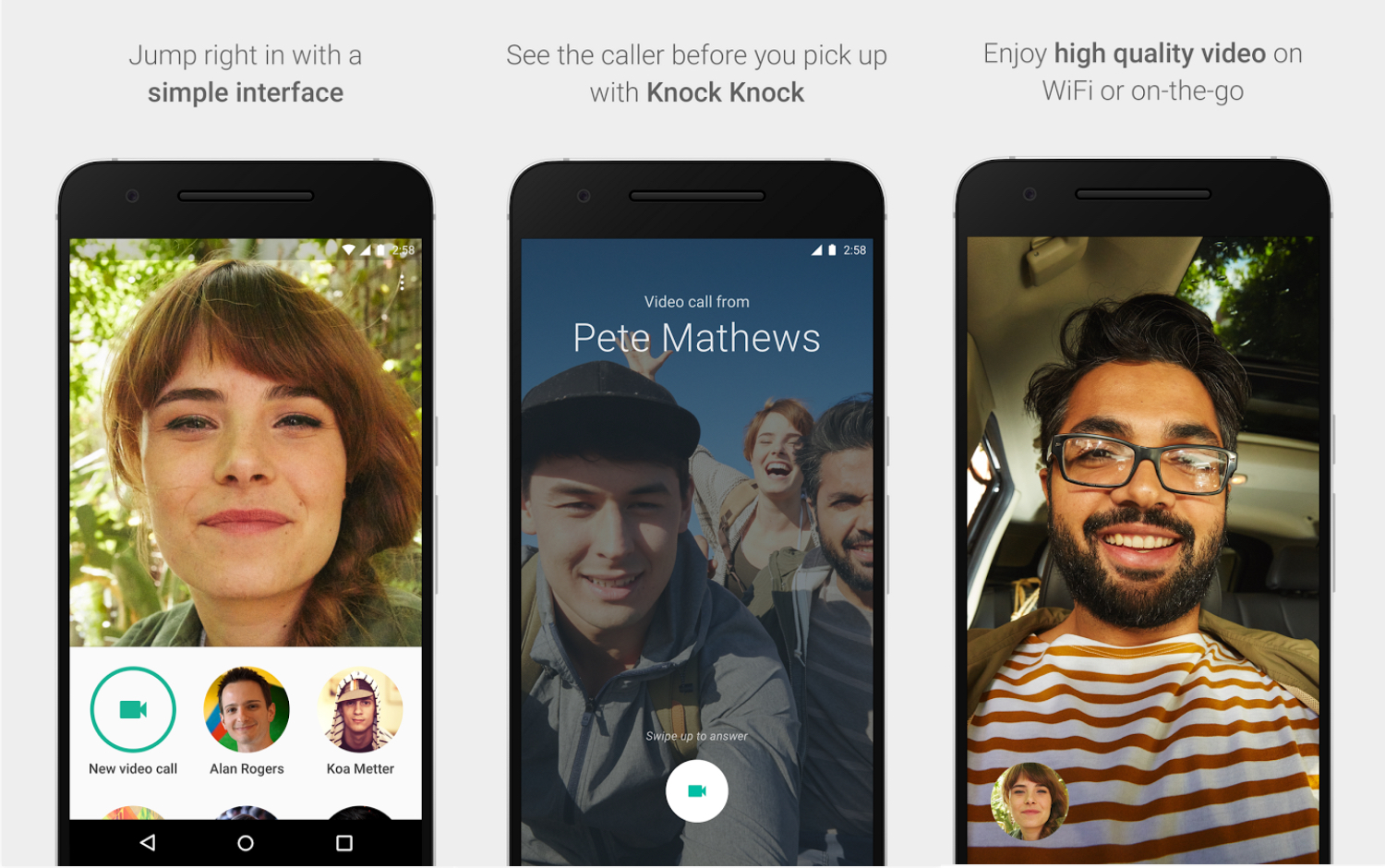
It’s simple. All you have to do is tap on the “Video Call” button and call someone you want. After that all your recent contacts will just show up as bubbles so you’re one tap away from calling anyone.

screenshot_20161112-161801

The specialty here is the “Knock Knock” feature which allows you to see what the person who’s calling you has to show. You will see a live video from them even before answering.
duo-google

That’s about it when it comes to using Google Duo. There are some settings that you can tweak inside the settings as well. Check it out if you want more control over the little things like disabling “Knock Knock”.

If you found this helpful, Please share it with your friends too, and motivate them to start using Duo so that you have more and more people to talk to.

Total
0
Shares
Share 0
Tweet 0
Pin it 0
Related Topics
  • Google
  • Google Duo
  • How-To
  • Tutorial
  • Video Calls
Banu

I'm Banu. I also go by as "Andro Dollar". I am a passionate tech geek born and raised in Sri Lanka who likes to do creative things and look at things differently. I'm a risk taker and a perfectionist. If I'm doing something, I'll do it right! That's my Moto.

Previous Article
googleallo-androdollar

HOW TO : Use Google Allo

  • Banu
  • November 12, 2016
View Post
Next Article
cable2-520×354

HOW TO : Connect a laptop to a TV via HDMI, VGA and USB

  • Banu
  • November 14, 2016
View Post
You May Also Like
View Post
  • How To

HOW TO : Add a VPN to your web browser in 3 simple steps

  • Writer Andro Dollar
  • May 10, 2019
View Post
  • How To

How to install Android P on your Google Pixel 2, Pixel 2 XL, Pixel or Pixel XL

  • Banu
  • March 8, 2018
View Post
  • How To

HOW TO : Install Android 8.0 Oreo Beta on to your Huawei Nova 2i NOW

  • Banu
  • March 3, 2018
View Post
  • How To

Bring back the “View Image” button on Google Images in less than 1 minute

  • Banu
  • February 19, 2018
screen-shot-2016-12-08-at-10-02-44-pm
View Post
  • How To

HOW TO : Take a screenshot on Android phones and tablets

  • Banu
  • December 8, 2016
fix-mobile-network-not-available-error-1000×875
View Post
  • How To

How To : Fix Android’s ‘insufficient storage available’ error message

  • Banu
  • November 28, 2016
Technicians working on electronics or motherboard
View Post
  • How To

HOW TO : Fix a PC that won’t start up

  • Banu
  • November 20, 2016
cable2-520×354
View Post
  • How To

HOW TO : Connect a laptop to a TV via HDMI, VGA and USB

  • Banu
  • November 14, 2016

Leave a Reply Cancel reply

You must be logged in to post a comment.

Ebates Coupons and Cash Back
Andro Dollar Andro Dollar
  • Advertise on Andro Dollar
  • Videos
  • Gaming
  • About Us
  • Contact Us
  • Newsletter
  • Wallpaper
  • Privacy Policy
  • Terms and Conditions
Tech with over a decade of experience

Input your search keywords and press Enter.

Powered by Joinchat
Hello 👋
Can we help you?
Open chat