Andro Dollar Andro Dollar
  • Advertise on Andro Dollar
  • Videos
  • Gaming
  • About Us
  • Contact Us
  • Newsletter
  • Wallpaper
  • Privacy Policy
  • Terms and Conditions
Andro Dollar Andro Dollar Andro Dollar
  • Videos
    • Unboxings
    • Reviews
    • Tips
    • Vlogs
    • Best Apps
    • Best Games
  • Shorts
  • Reviews
  • News

HOW TO : Block KMP From accessing the internet

  • Banu
  • December 11, 2013
  • 1 minute read
Total
0
Shares
0
0
0

KMP is one of the best Video Players available for Windows. It has so many useful and interesting features and KMP has the option of changing themes and tweaking the appearance/Settings. But recently the team behind the KMP started porting ADs on to the player, which made it Ugly & Laggy. This tutorial is on How you can block KMP from Accessing the internet so that it won’t display ads.

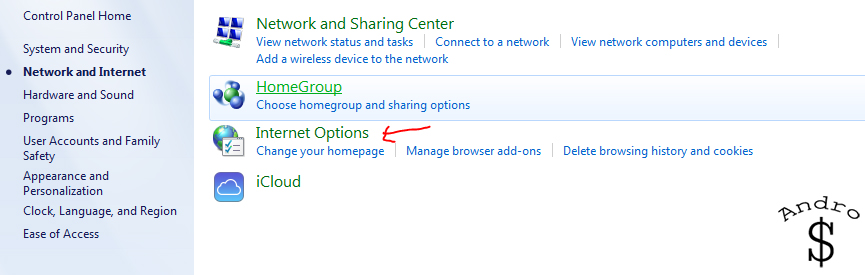
First open the Control Panel from the start Menu.Then Find and open Internet Options.

1

2

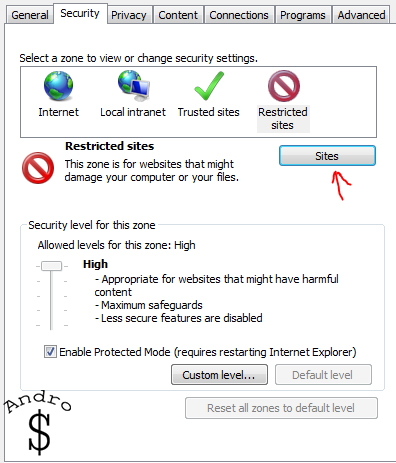
Then Click on the Security Tab and then hit on Restricted Sites.
3

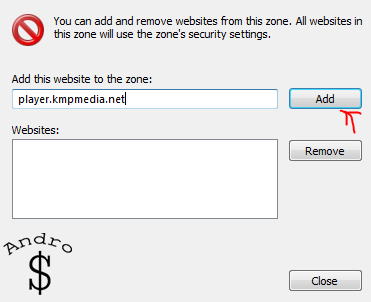
Then Click on “Sites” and You need to add the KMP Server to the restrcited Sites. To do this type, “player.kmpmedia.net” into the dialog box and Click on Add. This will add the site to the restrcitions and KMP wont be able to use the internet afterwards.
4


That’s it.. Now you can enjoy KMP Without any ads. If you found this helpful please Like & Share it with your friends. Stay Tuned for more great Tips in the future.

 

Total
0
Shares
Share 0
Tweet 0
Pin it 0
Related Topics
  • Internet
  • KM Player
  • KMP
  • Micorosft
  • Windows
  • Windows 7
Banu

I'm Banu. I also go by as "Andro Dollar". I am a passionate tech geek born and raised in Sri Lanka who likes to do creative things and look at things differently. I'm a risk taker and a perfectionist. If I'm doing something, I'll do it right! That's my Moto.

Previous Article

The Samsung Galaxy J is out

  • Banu
  • December 11, 2013
View Post
Next Article

Ubuntu to power a high-end smartphone by next year

  • Banu
  • December 11, 2013
View Post
You May Also Like
View Post
  • How To

HOW TO : Add a VPN to your web browser in 3 simple steps

  • Writer Andro Dollar
  • May 10, 2019
View Post
  • How To

How to install Android P on your Google Pixel 2, Pixel 2 XL, Pixel or Pixel XL

  • Banu
  • March 8, 2018
View Post
  • How To

HOW TO : Install Android 8.0 Oreo Beta on to your Huawei Nova 2i NOW

  • Banu
  • March 3, 2018
View Post
  • How To

Bring back the “View Image” button on Google Images in less than 1 minute

  • Banu
  • February 19, 2018
screen-shot-2016-12-08-at-10-02-44-pm
View Post
  • How To

HOW TO : Take a screenshot on Android phones and tablets

  • Banu
  • December 8, 2016
fix-mobile-network-not-available-error-1000×875
View Post
  • How To

How To : Fix Android’s ‘insufficient storage available’ error message

  • Banu
  • November 28, 2016
Technicians working on electronics or motherboard
View Post
  • How To

HOW TO : Fix a PC that won’t start up

  • Banu
  • November 20, 2016
cable2-520×354
View Post
  • How To

HOW TO : Connect a laptop to a TV via HDMI, VGA and USB

  • Banu
  • November 14, 2016

Leave a Reply Cancel reply

You must be logged in to post a comment.

Ebates Coupons and Cash Back
Andro Dollar Andro Dollar
  • Advertise on Andro Dollar
  • Videos
  • Gaming
  • About Us
  • Contact Us
  • Newsletter
  • Wallpaper
  • Privacy Policy
  • Terms and Conditions
Tech with over a decade of experience

Input your search keywords and press Enter.

Powered by Joinchat
Hello 👋
Can we help you?
Open chat